


Choosing the Right Self Service Kiosk for Your Business
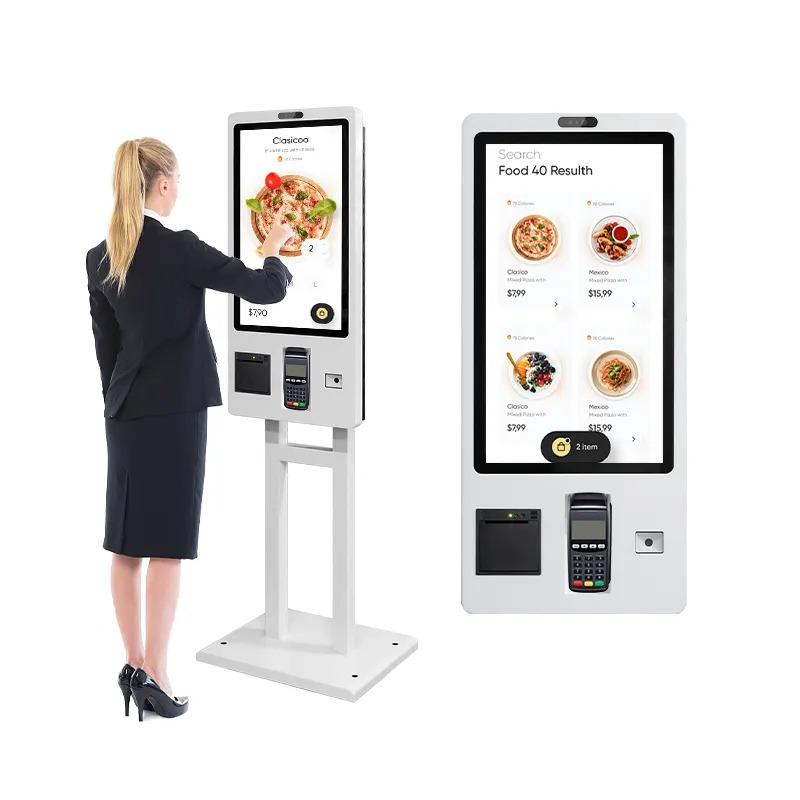
In today’s fast-paced world, businesses are looking for ways to improve efficiency, reduce operational costs, and enhance customer experience. A self service kiosk can be a game-changer for retail, hospitality, healthcare, and many other industries. However, choosing the right kiosk requires careful planning and understanding of your business needs. This guide will help you navigate the key considerations.
1. Understand Your Business Needs
Before selecting a self service kiosk, assess what you want it to achieve:
-
Reduce waiting times: In restaurants, hotels, or retail stores, kiosks can streamline ordering, check-in, or checkout.
-
Increase sales: Interactive kiosks can upsell products or services.
-
Collect data: Kiosks can gather customer preferences and feedback for better marketing decisions.
-
Enhance customer experience: Provide convenience, personalization, and faster service.
Knowing your primary goals will guide the type and features of the kiosk you need.
2. Decide on the Type of Kiosk
There are various types of self service kiosks designed for specific functions:
-
Ordering kiosks: Ideal for restaurants and cafes to let customers place orders directly.
-
Payment kiosks: Allow users to pay bills or checkout in retail stores without staff assistance.
-
Information kiosks: Provide directions, product info, or event details.
-
Check-in kiosks: Common in hotels, airports, and healthcare facilities for quick registration.
-
Interactive kiosks: Enhance engagement through touchscreens, videos, or gamified experiences.
Choosing the right type ensures the kiosk aligns with your operational needs.
3. Consider Hardware Specifications
The effectiveness of a self service kiosk depends heavily on its hardware. Important factors include:
-
Display size and type: Touchscreen displays should be responsive and readable from different angles.
-
Durability: Commercial-grade kiosks withstand heavy usage and harsh environments.
-
Connectivity: Ensure the kiosk can connect via Wi-Fi, Ethernet, or cellular networks.
-
Peripheral devices: Consider printers, scanners, card readers, or cameras depending on the services offered.
Hardware quality directly impacts reliability and customer satisfaction.
4. Software and User Interface
A user-friendly interface is critical. Key considerations:
-
Intuitive design: Simple navigation ensures first-time users can operate it easily.
-
Customization: Software should allow branding, promotions, and tailored workflows.
-
Integration: Ensure compatibility with existing POS systems, CRM platforms, or payment gateways.
-
Security: Protect customer data with secure authentication and encrypted transactions.
Software often determines how effective the kiosk will be in achieving your business objectives.
5. Location and Accessibility
Where you place your self service kiosk affects its usage:
-
High-traffic areas: Position kiosks where customers naturally congregate.
-
Accessibility: Make sure it’s reachable for people with disabilities, including height and reach considerations.
-
Visibility: Well-lit areas encourage interaction and prevent misuse.
Proper placement increases usage rates and maximizes ROI.
6. Maintenance and Support
A self service kiosk requires ongoing maintenance:
-
Technical support: Choose a vendor offering timely support for hardware and software issues.
-
Remote monitoring: Helps track performance, detect malfunctions, and reduce downtime.
-
Regular updates: Software updates keep features fresh and secure.
A well-maintained kiosk ensures a smooth customer experience and longevity of investment.
7. Budget and ROI
Consider both upfront and long-term costs:
-
Hardware costs: Commercial-grade kiosks may cost more but last longer.
-
Software licensing: Subscription models versus one-time purchases.
-
Operational savings: Reduced labor costs can offset initial expenses.
-
Revenue growth: Upselling features and faster transactions can improve profits.
A careful cost-benefit analysis helps determine the most suitable self service kiosk for your business.
8. Future Scalability
Plan for future growth:
-
Can you add more kiosks easily as demand increases?
-
Is the software scalable for new services or products?
-
Will hardware upgrades be compatible with existing infrastructure?
Choosing a scalable solution prevents the need for a complete replacement as your business grows.
Conclusion
Selecting the right self service kiosk involves balancing functionality, usability, and cost. By analyzing your business needs, hardware and software requirements, location, and long-term scalability, you can choose a kiosk that improves customer satisfaction, operational efficiency, and profitability. Investing in the right kiosk today can position your business for growth and enhanced customer engagement tomorrow.

 English
 Arabic
 French
 Spanish
 Portuguese
 Deutsch
 Dutch
Dutch
 Italiano
 Russian
 Romaian
 Portuguese (Brazil)
 Greek
Greek